Guide 08·Clean up
How to remove watched videos from Watch Later.
Updated 16 November 2026
Short answer
On your Watch Later page, open the list's menu (the three dots near Play all) and choose Remove watched videos. It removes everything YouTube counts as watched, all at once, with no preview and no undo. To choose what goes, by length, age, channel or how far you got, and undo it afterwards, use Needle's Select on the same page.
01·On YouTube
YouTube's own button
- Open your Watch Later at youtube.com/playlist?list=WL.
- Open the list's menu, the three dots near Play all.
- Choose Remove watched videos and confirm.
It's all or nothing. Everything YouTube counts as watched goes, including the one you meant to watch again, and nothing it counts as unwatched does, however old. There's no preview and no undo.
The YouTube app has the same option in the ⋮ menu at the top of Watch Later. To take out a single video, on either, open the ⋮ next to it and choose Remove from Watch later.
02·What counts
What counts as watched
YouTube doesn't publish where it draws the line, and the button doesn't show you a list before it acts. The best clue is the red bar along the bottom of each thumbnail: it's how far you got, and a video with a full bar is the kind that goes. One you opened for ten seconds and left is the kind that stays, however many years it's been sitting there.
That's the real gap. Watch Later doesn't fill up with videos you finished. It fills up with videos you saved, meant to watch, and never started, and the button never touches those.
03·With Needle
Pick exactly what goes, with Needle
- Open your Watch Later and press the needle button in the bottom right corner, or Alt+Y.
- Press Select.
- Click the videos to go, or let a filter choose: Pick the finished ones, or set filters and Pick all shown.
- Press Remove from Watch Later and confirm the number.
- Changed your mind? Undo in the corner puts them all back.
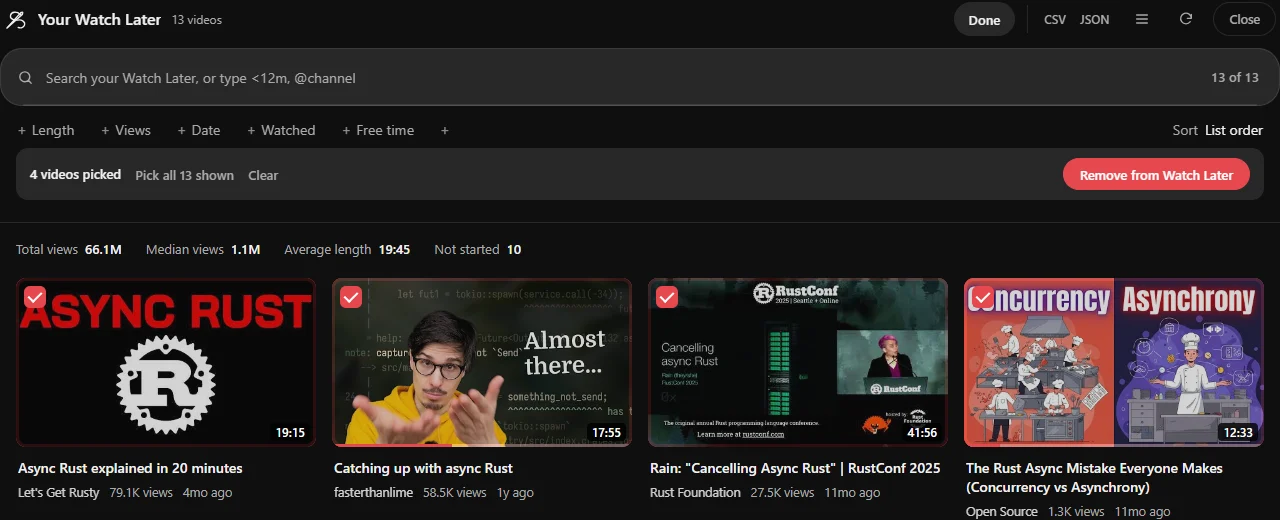
Filters decide, so you don't have to click 300 times
unwatched >1h | Long videos you saved and never started |
before:2023 | Anything uploaded before 2023 |
@name | Everything from one channel |
is:watched | Everything you've finished |
Type a filter in the panel's box, then Pick all shown: exactly those, and nothing else.
After one video rather than a clear-out? How to search your Watch Later.
Lists longer than 100 videos
Needle reads the first 100 unless Deep reading is on (press Read all in the panel, or switch it on in Needle's settings), the same as when searching. Turn it on to clean up the whole list.
04·Before you clear
Before a big clear-out
Undo covers the batch you just removed. For anything bigger, keep a list first: set the filters, then Export in the panel and Download CSV. You get every title and link that's showing, so clearing 800 videos isn't a one-way door. What each export contains.
A few filters worth trying before you pick anything:
unwatched before:2024 | Uploaded before 2024 and never started |
is:started | Ones you gave up on partway, to finish or let go |
>2h | Everything over two hours, to look at before it goes |
Not sure the list is worth cleaning yet? See how many hours it adds up to first.
05·Questions
Questions?
Can I get videos back after Remove watched videos?
Not in one go. YouTube's button has no undo, so each video has to be found and saved again. Needle's Undo puts back the whole batch it just removed.
Where does Needle draw the line for finished?
At 90% watched by the red bar, unless you change Finished at in Needle's settings. Everything it picks is ticked on screen before you press Remove, so you see the line before anything goes.
Is removing with Needle safe?
It sends YouTube's own remove action, the same one YouTube's menu uses, only after you confirm the number. Undo puts them back with YouTube's own Save to Watch later action.
Can it remove videos from my other playlists?
Yes, from playlists you made yourself, and it can unlike videos in bulk on your Liked page. Same Select, same confirm, same undo.
Does it need extra permissions?
No. It is off until you turn it on, in Needle's settings or the first time you press Remove, and it only touches lists that are yours: Watch Later, your own playlists and your likes, each time after you confirm.