Guide 03·Watch Later
How to search your YouTube Watch Later.
Updated 16 November 2026
Short answer
YouTube has no search box for Watch Later. The search bar at the top searches all of YouTube, and Ctrl+F only finds the videos the page has already loaded. To search the whole list, and filter it by length, views or channel, you need an extension that reads the list first. Needle does this for free, inside YouTube.
01·The problem
Why YouTube won't search it for you
Watch Later is a playlist, and YouTube doesn't let you search inside playlists. You can reorder it, but there's no search box and no filters. The big search bar at the top doesn't help either: type into it and you're searching all of YouTube, not your list.
It gets worse as the list grows. The page loads your first 100 videos and fetches the rest in batches as you scroll, so anything further down isn't on the page yet and nothing can find it.
02·The workaround
The quick fix: Ctrl+F
- Open your Watch Later at youtube.com/playlist?list=WL.
- Scroll to the bottom and keep going until no more videos load. Long lists take a while.
- Press Ctrl+F (Cmd+F on a Mac) and type a word from the title or the channel name.
It works, but only on words. You can't ask for the videos under 20 minutes, or the ones you haven't started, and you have to scroll the whole list in again every time.
03·On your phone
On your phone
The YouTube app has no search for Watch Later either. Tap You, then Watch later, and it's a list to scroll, with no Ctrl+F to fall back on. If you remember who made the video, it's usually quicker to go to that channel and look there.
04·Limits
What else gets in the way
- It loads in batches. 100 videos at first, then more as you scroll, which is why anything far down is invisible to Ctrl+F until you've scrolled to it.
- It stops at 5,000. Watch Later holds 5,000 videos, like any playlist. When it's full, saving another one doesn't work until you remove some.
- Some videos are hidden. Videos that were deleted or made private drop out of view, and a note at the top says how many, like 1 unavailable video is hidden. The list's ⋮ menu has Show unavailable videos if you want them back on screen to remove them.
05·With Needle
Search and filter the whole list with Needle
Needle is a free Chrome extension that reads your Watch Later and lets you search it two ways.
From YouTube's search bar
Start typing anywhere on YouTube. Matches from your Watch Later show up under In your Watch Later, above YouTube's usual suggestions, with each video's length and whether you've started it.
Add in:wl to search only Watch Later. in:wl cooking <20m finds the cooking videos you saved that are under 20 minutes.
On the Watch Later page
- Open your Watch Later.
- Press the needle button in the bottom right corner, or Alt+Y.
- Type to search, or add a filter: Length, Views, Date, Watched, or Free time, which shows only what fits in the minutes you have.
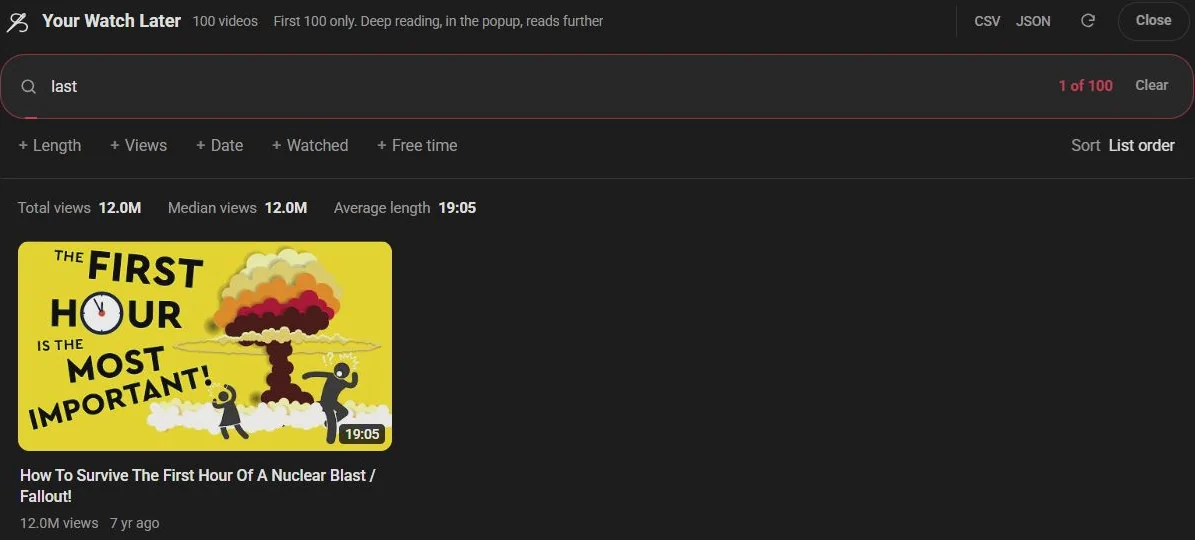
The sort menu puts the list shortest or longest first, and the line above the videos shows how many hours it adds up to.
Lists longer than 100 videos
Out of the box Needle reads the first 100 videos, same as the page. For longer lists, press Read all in the panel, or turn on Deep reading in Needle's settings (All settings, in the popup). It reads the rest of the list the way YouTube's own page does when you scroll, and what it reads stays on your device. The privacy policy explains exactly how.
06·Filters
Filters that work on Watch Later
<20m | Shorter than 20 minutes |
>45m | Longer than 45 minutes |
>100k | More than 100K views |
unwatched | Never started |
is:started | Started, not finished |
@name | From that channel |
-word | Leave out anything mentioning it |
sort:shortest | Shortest first (also longest, views, newest, oldest) |
They combine, so in:wl unwatched <15m is the answer to "what can I watch on my break".
07·Clean up
Clean it up while you're there
Found three years of videos you'll never watch? Press Select in the panel, pick them (or filter first and pick everything shown), and remove them from Watch Later, with an undo straight after. How cleaning up works.
08·Questions
Questions?
Can you search Watch Later in the YouTube app?
Not in the app, and not with Needle either. Needle is for YouTube in a desktop browser: Chrome, or another browser that installs extensions from the Chrome Web Store.
How many videos can Watch Later hold?
5,000, the same as any playlist. Once it's full YouTube won't save more until you remove some, and clearing out what you've already watched is the quickest way to make room.
Does this work for Liked videos too?
Yes. The same panel opens on your Liked videos page, and in:liked searches them from the search bar.
Can Needle remove videos from Watch Later?
Yes, when you ask it to. Press Select in the panel, pick videos, and remove them, with an undo straight after. It is off until you turn it on.
Is my Watch Later sent anywhere?
No. Needle has no server. It reads the list from youtube.com with the session you're already signed in with, keeps it on your device, and never sends it anywhere.