Guide 01·Watch history
How to search your YouTube watch history.
Updated 16 November 2026
Short answer
On a computer, open youtube.com/feed/history and use the Search watch history box. It finds videos you've watched by the words in them. It can't filter by channel, length or date, so for "that 20 minute video from last month" you need Google's My Activity, or Needle, which adds those filters and shows your history right in YouTube's search bar.
01·On YouTube
Search your history on YouTube
- Go to youtube.com/feed/history, or History in the left menu.
- Find the Search watch history box.
- Type a word you remember from the title.
Good when you remember the title. Less good when you remember it was about twenty minutes long, from a channel you'd never heard of, sometime in August. The box takes words and nothing else.
02·On your phone
On your phone
- In the YouTube app, tap You at the bottom.
- Next to History, tap View all.
- Tap the magnifying glass at the top and type a word from the title.
Same rules as on a computer: it matches words, and that's all. It's the same history, though, so a video you watched on your phone turns up on your computer and the other way round, as long as you were signed in to the same account.
03·My Activity
Filter by date with Google My Activity
Google keeps the same history with dates attached. Open myactivity.google.com/product/youtube and use Filter by date to narrow it to a day or a range. You can search by keyword there too. It's slow to scroll, though, and it doesn't know how long a video is or whether you finished it.
It has one thing the History page doesn't: what you searched for on YouTube, mixed in with what you watched. If you remember typing "sourdough starter" but not which video you clicked, search My Activity for those words. The list runs newest first, so the video you watched next is usually the entry just above the search.
04·Takeout
Download your whole history and search that
For one search across everything YouTube has kept, years of it, download a copy from Google Takeout:
- Go to takeout.google.com and press Deselect all.
- Tick YouTube and YouTube Music, open All YouTube data included, and leave only history ticked.
- Create the export. Google emails you a link when it's ready, which for history on its own is often a few minutes.
- Open
watch-history.htmlfrom the download and press Ctrl+F.
Every video is in there with its channel and the date and time you watched it, so a channel name or a date finds things the History page can't. It's a snapshot, though: what you watch afterwards needs a new export. Multiple formats in the same step offers JSON instead of HTML, if you'd rather work with it in a spreadsheet tool or a script.
05·Missing videos
Why a video you watched isn't there
- History was off. Anything watched while watch history was paused was never saved. The History page's side panel shows whether it's on now.
- Auto-delete. Google can delete history older than 3, 18 or 36 months, and accounts made since mid-2020 start at 36. Manage all history on the History page shows your setting.
- A different account. Signed out, in an incognito window, or on another account or Brand Account channel: each keeps its own history, or none at all.
- The video is gone. When a video is deleted or made private, it drops off the History page.
06·With Needle
Search it by channel, length and date with Needle
Needle reads your history into your browser and makes it searchable the way you actually remember videos.
From the search bar
Type anything on YouTube and videos you've watched appear under You watched, with when you watched them and how far you got. Close spellings still match, so half a title is usually enough.
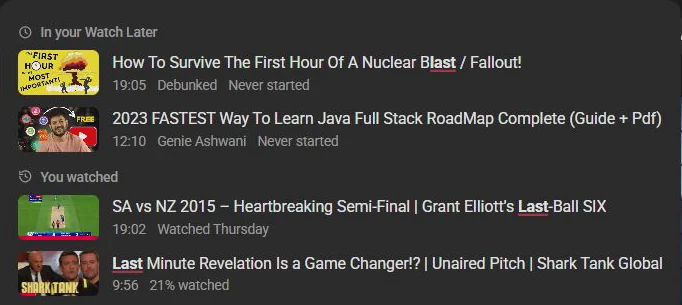
Add filters as you go:
in:history @veritasium | Everything you've watched from Veritasium |
watched:august <20m | Short videos you watched in August |
in:history is:started | Things you started and never finished |
watched:yesterday | Also today, week, last-week, month, or a month like 2026-08 |
On the History page
Press the needle button in the bottom right corner of your History page, or Alt+Y, for the full panel: filter by channel, length, views or when you watched it, and sort any way you like. Every filter you can type.
Going further back
Needle reads the first page of your history by default. Press Read all in the panel, or turn on Deep reading in Needle's settings, to go further. In one test it read 1,464 videos going back 68 days, and still hadn't run out. The privacy policy explains how it works.
The same search reaches the other lists YouTube keeps for you: Watch Later and Liked videos. And to stop finished videos turning up on Home again, hide what you've watched.
07·Questions
Questions?
How far back does YouTube keep my watch history?
As far back as your account goes, unless auto-delete is on. Accounts made since mid-2020 start with history older than 36 months deleted automatically, and you can change that to 3 or 18 months, or turn it off, in My Activity.
Needle can't find a video I know I watched. Why?
It searches what it has read so far, which is the first page of your history unless Deep reading is on. If YouTube itself no longer has the video, for one of the reasons above, Needle can't find it either.
Can I search my watch history in the YouTube app?
By words, yes: You, then History, then the magnifying glass. Needle itself is for YouTube in a desktop browser, so the channel, length and date filters are computer only.
Does Needle keep a copy of my history?
Only on your device, in the browser's own storage, so searching it is instant. It never leaves your computer, and Clear copied lists, in Needle's settings, wipes it.
Does it change my history?
No. Needle only reads your history. It never adds, removes or pauses anything in it. The only changes it can make to your account are ones you ask for, like removing videos from Watch Later, and it asks before each one.